Twitter

LG Optimus Black vs HTC Sensation

We take a look at how the new HTC Sensation stacks up against LG's new Optimus Black We compare the LG Optimus Black to HTC’s Sensation. Form: LG Optimus Black - 122x64x9.2mm...

HTC Incredible S vs LG Optimus Black

It's time for HTC's Incredible S to earn its moniker as it goes head-to-head with LG's bank balance friendly super phone, the Optimus Black As the successor to the fantastic Desire HD, the HTC Inc...

HTC Flyer WiFi Review

A lovely white plastic and silver metal chassis, a smooth 7-inch 1024 x 700 pixel resolution capacitive touchscreen capable of working with special Scribe pen surrounded by a generous black border...

Confirmed: EVO 3D’s Bootloader, Recovery, and Kernel Images All Locked Down

It seems HTC has finally caved to what are likely the security demands of wireless carriers with its newest phones, and is locking down its handsets Moto-style. Latest case in point: the EVO 3D – which sports the same sort of security we found on....

HTC ChaCha price revealed for Facebook fans

HTC’s first Android Facebook phone, the HTC ChaCha, has been priced and (roughly) dated by UK retailer Carphone Warehouse. The smartphone – which has a 2.6-inch touchscreen, full QWERTY...

Showing posts with label Android Apps. Show all posts

Friday, 3 June 2011

Thrutu App Gets A Massive Update, Adds Tons Of Features To Your Phone Calls


Out of all the things that we use smartphones for these days, calls come in pretty close to last. We’re too busy texting, taking pictures, surfing the web, getting directions… you get the idea. What if we could incorporate all of these things into our phone calls though? That’s exactly what Thrutu aims to do, and the newest update to the app makes most of that possible. Here’s a video to get a better idea:
Every feature isn’t highlighted in the video, though – it can actually do even more than that. Here’s a breakdown of each option, directly from the Market listing:
  • Location: callers can see each other’s position on a map, updating live as they move.
  • Camera: snap and share a photo during a call
  • Doodle: instantly share sketches – or annotate maps and photos – during a call.
  • Gallery: select and share a photo from those already stored on the phone.
  • Contacts: share contact details that will appear instantly in the other caller’s address book.
  • Prod: for the first time, you can convey touch in a phone call! Playfully poke the other person by causing their phone to vibrate during the call.
It’s also possible to install buttons developed by the community, using Thrutu’s APIs. Here’s a few:
  • PayPal: send money, instantly and securely, to the person you’re talking to
  • Meet Me: quickly find the best place to meet in person
  • Shared Search: search and browse the web together
  • Coin Flip: make decisions or settle arguments with the flip of a coin
Another really cool feature of Thrutu is Google Voice integration. If you don’t want to use it with your primary mobile number, or you use Google Voice exclusively, then (once activated) Thrutu will seamlessly integration with Voice.
Unfortunately, Thrutu is near-useless on 3G CDMA phones (unless you’re on Wi-Fi) due to the lack of simultaneous data and voice. Still yet – it’s a really cool concept, and could prove to be quite valuable (if you can get everyone you know to use it, of course).
You can grab Thrutu for free in the Android Market.
Thrutu
Download Thrutu from the Android Market
Download Thrutu from AppBrain
QR code for market://details?id=com.thrutu.client

[New App] VideoSurf: It’s Like IntoNow For The iPhone, Only… Worse


When you hear a song and don’t know what it is, but want to find out, what do you do? Fire up Shazam or SoundHound, of course. But what do you do when you see a video that you’re lookin’ to identify? Well, there hasn’t really been a solution on Android to handle this sort of debacle – until now, that is.
ss-0-320-480-160-0-579ef70177c9088c2b6a1ab175668d48e5ec1382 ss-2-320-480-160-0-ca1af907634d18b2bc17972b2cc8f25bad640eaa ss-3-320-480-160-0-2ef05c30e4e4d5861ffe1be8890d8f8ba454347c
Calling itself the "ultimate video discovery" app, VideoSurf is a direct answer to the iPhone’s IntoNow – it can identify videos through audio and video recognition, suggest other videos, and locate other videos using keywords. According the VideoSurf website, there is "no need to open a new application", as it can "play practically any video on the web inside [the] app!" It also offers Facebook and Twitter integration, so you can easily share, Like, or Tweet any video directly from within the VideoSurf app.
We decided to give this app a shot, and our first impression wasn’t so good. After attempting to get it to identify both Family Guy and Lost, it came up empty handed. Hopefully the developers are hard at work on correcting these sorts of issues, because, let’s face it – if it can’t even detect something as popular as Family Guy or Lost, then it’s still got a long way to go.
Yet another downside is that this app is only available on select Verizon Wireless smartphones, but the VideoSurf Team is planning on bringing it to other devices soon. They said that it should work on all VZW devices running 2.2 or higher – but I couldn’t install it on my OG Droid, so it may be hit-or-miss.
If you’re feelin’ froggy – head on over the Android Market where you can grab this app for free. Hopefully you get better mileage than we did; drop us a line in the comments and let us know how it goes.
VideoSurf
Download VideoSurf from the Android Market
Download VideoSurf from AppBrain
QR code for market://details?id=com.videosurf.activity

Tampermonkey App Brings Augmented Browsing to Android


Now if you are a fan of the Greasemonkey Firefox extension or Tampermonkey’s Chrome version, you’re probably thinking “awesome!”, while the rest of us are thinking “what’s augmented browsing?” Apps like Tampermonkey allow you to utilize scripts to make changes to websites as you browse. This is very open ended, but to give you a better idea, of what this means, some of the popular uses for such apps are removing ads, auto-filling forms, or transposing info from another site, onto the one you’re viewing.


Obviously this is a very powerful tool, but it needs scripts to do anything. Luckily, this app is compatible with Greasemonkey scripts as well as Chrome Tampermonkey scripts, meaning it should be able to use any pre-existing script you can dig up on the internet. The downside here is that they may not run perfectly.
The developer of the app states that it is still in beta, and that since phones are not as powerful as the computers that use the Chrome app it’s adapted from, it may be a bit sluggish for now. Given its limitations, Tampermonkey doesn’t appear to be quite ready for the big time yet. If you’re familiar with Greasemonkey or Tampermonkey and want to test out scripts to lend a hand to its development head over to the XDA thread and jump on in. For the rest of us, given the beta status and the current lack on instructions, waiting may be the wiser choice. The app shows great promise though and could shape up to be an awesome tool as it progresses to it’s final stage.
[via XDA]

Red Cross launches new S.O.S app for Android users


If you are, the sort of person that likes to be prepared for anything this new app might appeal to you. The app comes from the Red Cross and offers tips for what to do in an emergency. The app also offers links to 911 that will dial the number for you. If you are ever in a life threatening emergency, you should dial 911 before you try and use this app.


This app is really aimed at what to do in the interim between dialing 911 and the ambulance showing up. It has links to tips on giving care. There are slide shows for different things you might need to do rather than full motion videos. The app can help diagnose some issues too.
It has walk throughs for what to do with simple questions like are they breathing and others. I guess this app is better than nothing, I wonder if it has got stuff inside like what to do for minor cuts or burns. That will be more helpful to most people than anything else.
[via Mobiputng]

Thursday, 2 June 2011

Glow Hockey 2 For Android, It’s What Tron Folks Do For Fun


The good folks over at Natenai Ariyatrakool have decided to release a second version of their popular Tron looking hockey game.  Glow Hockey 2 delivers better graphics and game play for single users or multi users (same device).  Single users can be challenged by the computer and multi-users, it’s recommended you play on a tablet if you can otherwise screen play can be a little tight.  We’d imagine the game play would be extremely smooth on a dual-core device.  Check out the cool features the game offers below and don’t forget to let us know what you think.  Hit the break for some cool screenshots and to check out the video demo of the game in action.  There’s also an Android market link for the download as well.  
YouTube Preview Image
FEATURES:
+ Multiplayer (on the same device).
+ 2 table themes.
+ Colorful glow graphics.
+ Smooth and responsive game play.
+ Realistic physics.
+ Quick play mode (single player), challenge yourself with 4 difficulty levels (easy to insane).
+ 4 selectable paddles and pucks.
+ Vibrate when goal.
*Android Market Link*

Dolphin Browser HD v5.0 clears beta, now offered ad-free


The popular 3rd party browser for android Dolphin HD has just updated today to version 5.0 after being in beta for a while. Along with the updated version comes some great new changes and improvements. One important note is the main app no longer has ads integrated. Before users needed an add-on that removed ads or had to pay for Dolphin. Version 5.0 is now ad-free.


Dolphin is to Android what Firefox and Chrome are to PC and Mac, a very versatile and feature complete browser. They have add-on support, bookmark folders, bookmark to sd backup/restore, tabbed browsing and more. Gestures can control the browser for all us touchscreen users. You can even restore a tab you’ve accidentally closed. They have added support for more themes, over 16 languages and more in this latest update to make Dolphin even more powerful. One of my favorite new features is the ability to copy all your bookmarks from the stock browser so the transition will be fast and easy for those that didn’t want to redo their bookmark collection.
They have updated the user interface with something they are calling the “Fire UI” and it sure looks nice, and clean. Personally I can’t help but feel like I’m using a blend of Google Chrome and the Android 3.0 Honeycomb browser, both of those are good things so I’d say that is a plus. It feels very comfortable and like something I am used to, the tabbed browsing on top with my Motorola Xoom was simple and smooth.
Pulling up your bookmarks is extremely easy with no tapping or hitting menu, simply swipe to the right and the bookmarks menu will appear (much better and smoother than Firefox Mobile’s implementation might I add). See the screenshot below.

Last but not least you have full-screen mode for those that want to use all of that screen real estate. On phones I use the full-screen feature, but on something like my Motorola Xoom or a tablet I feel that there is plenty of space to keep the bar up top for convenience.

I’m going to be enjoying Dolphin HD over the next few days and will report back anything I find or issues if I have any. For now feel free to get the latest and greatest ad-free Dolphin HD v5.0 in the Android Market by clicking here.
screen-20110601-1409 screen-20110601-1432 screen-20110601-1433 )

So Why Were the Yongzh’s Emulators Pulled?


There was much sadness when Android developer, yongzh, had his Market account deleted and line of popular game emulators pulled from the market. Many people were troubled by this news, seeing it as Google bowing to pressure from gaming companies. We’ve done a little bit of digging, and it seems that this may be a much simpler case of one developer breaking the law.


After the initial shock of the *oid emulators getting pulled, and then downloading the apks from their temporary home at SlideME to install on any future phones I own, I realized something didn’t add up. There are still tens, if not hundreds of emulators and ROM related apps on the Market. There were rumors swirling about that yongzh may have been banned, not because he was making emulators, but because he was violating open source licenses.
Lets start with some background on emulators. Emulators are a very cloudy subject legally. Trying to find information on the internet on the legality of emulators is actually quite difficult with conflicting reports and vaguely worded statements abounding. This is made that much worse when there are different laws for an emulator itself, and the ROM game images. We can’t condone or condemn emulators, but to the best of my knowledge, there is nothing explicitly illegal about an emulator, as it is usually the ROM itself which is considered to be the intelectual property of the company.

So yongzh’s apps were pulled, and as far as we can tell weren’t illegal, but other emulators remain in the Market. This is what started our looking into a rumor that yongzh was removed from the Market for violating open source licenses. Reports have popped up that snesoid, the Super Nintendo emulator app, was simply a java wrapper for the open source snes9x emulator.
We contacted the founder of snes9x and found out some details. The snes9x project was started in the 90s and is published under a license, which allows it to be copied and used so long as it is not for commercial purposes. While there was discussion on the snes9x forums about reporting yongzh, or even pursuing legal action back in February, we confirmed with the project founder, that he did not personally pursue yongzh.

So where does this leave us? What we know for sure at this point is that yongzh’s emulators were pulled from the market, yet apps which could not be any more legal than his in regards to emulator and ROM laws remain. Google’s response to me asking for details was generic as expected:
As a matter of policy, we don’t provide comment on individual apps or developers. I can confirm, though, that the apps that were removed were in violation of Android Market policies.
This does mean however, that Google had some official reason to remove the apps, or at least yongzh’s account. If this was removal due to infringing video game manufacturer’s intelectual property, it just would have made more sense that the companies claiming IP violation would have spent the time to apply it to other emulators. It seems most likely that either someone took it into their own hands to report yongzh’s use of the open source code, or Google discovered it themselves. Should anymore information come to light we will be sure to update you. In the meantime, continue to love Android and don’t panic just yet that the end of “Openness” is upon us.
)

PAC-MAN for Android Review [Amazon Free App of the Day]


It appears that BANDAI / NAMCO are making an effort to get into the mobile gaming world today as they’ve both released PAC-MAN for Android exclusively through the Amazon Appstore for free AND have showed up at the Qualcomm (Uplinq) conference alongside other brand giants collaborating with the chipmakers. What we’re looking at here is the PAC-MAN game on a couple of devices of note: the HTC ThunderBolt (because it’s still one of the most widely used devices on the LTE-having market right now,) and the Sony Ericsson Xperia PLAY because we wanted to see if the controls did anything with the game. Turns out they do – sort of.


Once you open this app you’ll notice the BANDAI / NAMCO logo in orange and yellow on white, then the game. Instantaneously and without a wait you’ll be playing PAC-MAN in classic arcade fashion. This app is set up for use on all screen sizes, but once you’ve got it up on a larger tablet, you’ll find that a large black border appears around your game screen. We’re hoping for a tablet-optimized version of the game in the near future.


The reason we ARE looking for an optimized version of the app is because it’s utterly amazing and totally classically worth playing. There’s a single control, that being the virtual joystick that you’re able to control from anywhere on the screen, then a pause screen that you can activate with your back button (or the Circle button if you’re on the Xperia PLAY.) Have a look then go get it for free from the Amazon Appstore!
Check out our Amazon Appstore 101 column for more information on the store if you’re totally unawares!

)

Wednesday, 1 June 2011

Get free unlimited reverse phone number look-ups with Number Guru


Been Verified recently released Number Guru, which provides free unlimited reverse phone number look-ups. You can also post comments about numbers that you look up which will help others in identifying phone spammers.
It is available now for Android, IPhone, and the Web. The app and service are free with no plans to charge in the future.
The app was recently updated last week and since then, Number Guru has been averaging 10 look-ups per second or 864,000 look-ups each day. Hit the QR code or source link to download from the Android market.

Riptide GP Upgraded Video Review


If you’ll recall all the way back in mid-April on the 19th, we had an early-early look at the completely awesome jetski racing game by the name of Riptide GP. This is a game we got to see first all the way back at CTIA 2011 being demoed on the T-Mobile / LG G-slate, a device we then got to review and use for our own initial review then and again for our final review now. Riptide GP is a game that’s both massively impressive and expansive in its graphics and ultra-simple in its gameplay. Steer your vehicle and win, experience the color fantasy.


This game is unique in that while you are racing using the entire device as your steering mechanism, you’re racing on a road of water. You’ll feel completely unique in your attack of the track while you splash and goosh through a track like you’ve never seen of felt before. Certainly there have been racing games that’ve taken place on the water in the past, but absolutely positively never on a level of impressiveness as this.

First let me show you the video of the review we did back in mid-April. Notice the background, the colors, and the waves, and get ready to compare them to the now current version of the game:


Now have a look at the update. Everything is just a LITTLE bit better it seems, that extra little push into excellent turning the game into one that’s not to be forgotten. Note that we’re again using the G-Slate to take a peek at this app and that the app is available for ANY device that’s got an NVIDIA Tegra 2 processor inside, not just tablets, but that we recommend you use a tablet for the win.


If you head over to the Android Market (or the Tegra Zone) and find Vector Unit, you’ll see that Riptide GP comes in a full version for $6.99 or a FREE DEMO that you can download for FREE. Now you’ve got NO reason not to try this mother out. Go get it!

Plants VS Zombies Review [Amazon App Store Free App of the Day]


Well would you look at that? Plants vs Zombies is out! It’s been on Apple’s iOS for what seems like forever and it’s finally lumbered its undead self on over to our favorite mobile platform, Android! And, following the example of Rovio’s Angry Birds RIO before it, Popcap has decided to release Plants VS Zombies on the Amazon Appstore first, it being free for the entire day today, today being May 31st, 2011. We’ve got a mini review of the game right here, too!


It’s a game that’s all about strategy. Certainly it’s not about shooting your enemy in the face, and you’ll never see a decapitated bear anywhere, but those undead humanoids, well, you’ve just got to take care of them. And what better way to destroy zombies than with plants? There IS no better way! Therefor you’ve got a grid which represents your yard, sheets of sod (aka brand new grass laid out like a red carpet), zombies coming at you very, very slowly, and plants that you can plant to defend yourself.

This game ends up being much more like a puzzle than it is like a shooter game or a level transgressor game. Instead you’re doing castle defense, where your castle is your neighborhood home and your archers and swordsmen are your sunflowers and your pea pod shooters. As you plant, you must catch suns as they fall from the sky. As the suns fall from the sky and you catch them, you gain energy enough to plant new flowers. As you be a levels, you gain seeds to plant new kinds of plants, flowers, vegetables, and more.

It’s completely killer fun, and like the greatest games for mobile, this one’s definitely hit on the touchscreen craze like a sawblade hits a treebranch, cutting with perfect teeth at the lifeblood that allows them to be successful. Play it!

Also go get it for free! Don’t know how to work the Amazon Appstore? Check out our very own Android Community 101: Amazon Appstore for everything you need to know. Exciting!

Sunday, 29 May 2011

Amazon AppStore updates to v1.14 with fixes and New two step purchase method


Early this morning I got an update for the Amazon AppStore on my device and it seems they’ve added a few updates worth noting. Mainly some bug fixes and things of that sort, but they have also implemented a new two-step purchase method where you must click twice. This should avoid accidental purchases for those unlucky enough to have done it by mistake. We didn’t hear anything regarding this til now, but it was a nice surprise.


This update also bring an improved compatibility check for the App of the Day amazon features, as well as some much needed improvements to the support for older devices running on Android 1.6 because apparently some still do. They also mention overall stability improvements.
It is nice to see Amazon keeping up to date with their popular new App Store, I have a feeling they will continue to improve it right up until they launch a few android devices of their own. So update your Amazon AppStore and feel free to get the latest free app of the day. Today it is Yoo Ninja.

Saturday, 28 May 2011

Get Great Deals On Your Android Device With The Coupons App


Are you a coupon buff?  Well, if you are, we’ve got something useful and productive for you to add to your arsenal of apps on your Android smartphone.  The Coupons App for Android gives you tons of great savings at many of the favorite stores you shop at.  The app features a great widget for your home screen, local gas prices and also encompasses a bar-code scanner for price comparisons.  There’s also an option to share a coupon with someone and pass that savings along if you want as well.  Want your Twitter and Facebook friends to see it also?  No problem, you can share it with them too.  Other features include voice search for coupons, the ability to save them to your calendar and sending coupons via SMS.  Check out this great app by heading over to our apps database where you’ll find a QR Code available or hit the Android Market up for the download.  As always, don’t forget to let us know what you think of the service in the comments below.  How do you think this app stands up to Groupon?  Hit the break for more screenshots and to check out the details from the developer.  
From The Develper:
The Coupons App features:
*Coupon WIDGET – Real-time coupons throughout your day.
*GAS pricing – Cheapest gas at local gas stations nearby.
*BARCODE scanner – Price comparison shopping tool.
*SHARE Coupon – Text & email coupons, Twitter coupons, even coupon sharing onto Facebook!
*VOICE search coupons – Fast, easy and hands-free coupon and product searching means it is now even easier to find exactly what you want at the lowest price available.
*SAVE Coupons – Coupon to calendar, one-tap maps navigate you to the nearest venue, phone the nearest location shown in each coupon and much more!
Coupons continuously update throughout each day, it’s like a fresh coupon buffet at your fingertips! Place the coupon widget onto your home screen and preview coupons instantly as they become available.
SMS Text coupon – sharing of coupons with any phone. You may even text each coupon to older analog phones without the Coupons App installed & on other carriers!
Search coupons – Coupon searching even while you stand in the store checkout line.
Redeeming coupons from The Coupons App is easy! Simply display coupon on your phone to cashier.

Netflix extends its device support with-in the Android app


Check out the latest updates to the Netflix app:
  • Various minor bug fixes.
  • Fixed application failure on startup when phone’s embedded storage space is almost full.
  • Removed check that prevented attempt to playback on unsupported devices.
  • Added support for LG Revolution, Motorola Droid and Casio G’zOne Commando C771.
That being said. you’ll notice that last bullet. Netflix has added additional support for three more devices. Nice to see them do this. This sets the list of supported devices at eight. The others being: HTC Incredible, HTC Nexus One, HTC Evo 4G, HTC G2, Samsung Nexus S. On top of this update, Netflix has removed the device check, that previously would not allow playback on devices that were unsupported. So i’d say download the app on your device, supported or not, and you just might get it to run.

Friday, 27 May 2011

SwiftKey X hits public beta today on Android Market


If you are looking for a better onscreen keyboard for your Android device, a new app has landed in the Android Market that you might want to check out. The app is a public beta, so don’t expect it to run perfectly. It is called SwiftKey X and builds on the TouchType SwiftKey keyboard to offer cloud personalization and it has a new prediction engine. The app also has a bunch of UI improvements according to the developer.


The SwiftKey typing experience can be customized to the user by integrating data from Facebook, Twitter, and Gmail as the SMS messages are sent. The typing style is fine tuned to match the way you use your phone for more efficiency. The prediction engine is also able to adapt the touch sensitive areas of the keys to allow predictions based on the way the user types.
There is a host of other features in the new beta app. The settings menu is redesigned from other versions of the app, it has a next gen fluency interface engine, the response times are improved, and the battery usage is reduced. The app also has improved typo and spelling correction. Any word can also be removed from prediction, not just words populated dynamically. Check out the Android Market page for all of the details.

SoundHound creators offer new app called Hound


The developer behind the app SoundHound app that we wrote about last in December 2010 has announced a new app for Android users. The new app is called simply Hound and is a voice search app for music. Users of the full version of the SoundHound app on the Android Market have noted in the reviews for Hound that the full version of SoundHound already has voice search. This is apparently aimed at people that don’t want to spend the $4.99 on the full version, but want voice search.


Hound claims to be the app that will help smartphones move from touch screens to voice searching. The app is a free download on the Android Market and on the Amazon Appstore for Android. The app will let you search for millions of songs using song title, artist, and band. You can get song previews, lyrics, and lots of artist information. That artist info includes album lists and the top songs.
Other features of the app include links to Amazon MP3 to buy the tracks, share links, video links, and links to tour dates and more. The app will run on any device with Android 1.5 or higher. The download size is 3.1M and it was added to the Android Market on May 26. If you have used this app let us know how well it works.

Thursday, 26 May 2011

mSpot Gets Update, Combines Your Music With Internet Radio


Up until now, there have been two types of music services to choose from (aside from local media, of course) – streaming radio like Pandora or Slacker, or personal content streaming with services like Google Music or Amazon Cloud Player. mSpot is looking to change the game, however, by combining the two.
The updated mSpot Music app really is a great idea – it combines your personal music collection with streaming music discovery radio. This is the type of service that I have wanted for quite some time now, because while I love to listen to my own music collection, I’m always looking for new artists to check out. Of course, with any new service such as this, implementation is key. Join me for a quick look for this new service to see how well it actually works.
First off, you need to an mSpot account to take advantage of the new services, so head over the mSpot.com and register for one. Nothing has changed in the area of cloud storage – you can still get 5GB for free, but if you need more storage space, you can bump it up to 40GB for $3.99 per month.
upload options
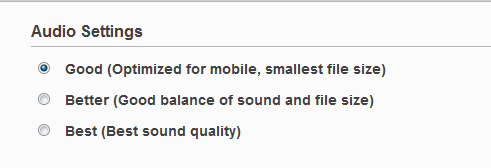
Finished with that? Great, now you can now start uploading your tunes. One very nice feature of mSpot is the option to change the audio quality during the upload process, which helps to save space and also improves streaming. I stayed with the "good" setting; but, then again, I’m no audiophile. As long as my music doesn’t sound grainy, then I’m good to go. If you prefer a higher bitrate, there are also options for "better" and "best." The actual bitrates are as follows:
  • Good: 48kbps AAC+
  • Better: 64kbps AAC+
  • Best: 96kbps AAC+


With all the fluff out of the way – lets dig into what’s new with the app/service. Visually, the app looks basically the same, with a minor tweak: radio has now taken the place of songs in the tabs that run across the top (there is an "All Songs" playlist now to take its place). Within the radio tab, there are a few options:
  • Suggested Station – it collects data from the music that you frequently listen to to create stations according to your particular taste in music.
  • mSpot Radio – like the name states, these are stations created specifically for use with mSpot.
  • Internet Radio – this one offers a much larger selection of stations from all across the great wide internet.
  • Personal Radio – stations that you’ve either created or listened to.

 
Once you choose a station to play, you are presented with the normal "Now playing" screen, with the addition of the typical internet radio-type controls in the navigation: block song, tag song, play, and next. As with other music discovery services, you are limited to the amount of songs that you can skip. mSpot chose to ration its users to 6 per hour, but I figure that if you’re skipping more than 6 tracks per hour, you’re probably jamming the wrong station.
All in all, the radio feature is exactly what you would expect. It’s good, but not yet great – there were a few instances when I tried to create a station from a particular artist and was presented with a "No stations found for insert artist here." although, I’m sure that as the service gains momentum, they’ll be adding more artists to the radio service.


There are also a few new features in the settings menu, like a lockscreen widget and EQ. Yes, EQ. I don’t know about you, but I was extremely excited when I found this feature as an EQ is something that is lacking from most Android music apps. While the EQ is still quite basic, it does provide enough control to tweak how your tunes sound with little hassle, which is a huge win in my book.
Overall, I would say that this whole update is a huge win, too, and I highly recommend everyone give it a shot. The combination cloud storage and music discovery is something that we’ve needed for a long time – and the added bonuses (like EQ) are just icing on the cake.
The app is free in the Market, but you’ll need to sign up for mSpot’s service in order to fully utilize it.
mSpot Music
Download mSpot Music from the Android Market
Download mSpot Music from AppBrain
QR code for market://details?id=com.mspot.android.aria

Related Posts Plugin for WordPress, Blogger...